What Is AI Automatic Stock Receiving?

AI Automatic Stock Receiving is a feature in MeeD POS that helps restaurants and shops log incoming stock faster, using OCR (Optical Character Recognition) technology together with an AI model to read data from a photographed document — a delivery note, tax invoice, or invoice that arrives with a supplier's shipment. Instead of staff having to hold the document next to the screen and key in each line item, the system automatically reads the product name, quantity, and unit cost from the image.
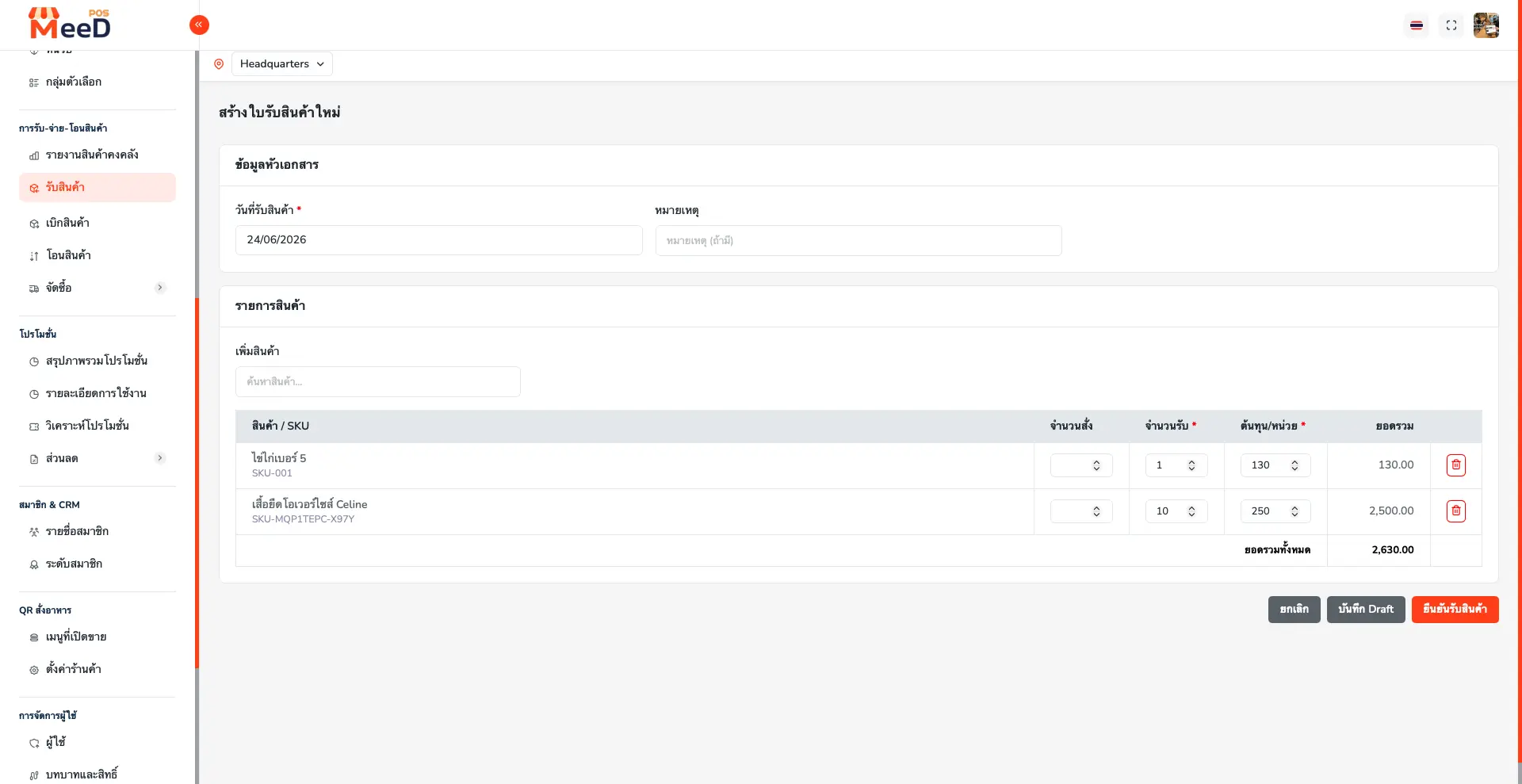
Once the data is read, the system compares each product name found against the shop's existing product list. When it finds a match, it fills the quantity and cost straight into the goods receipt. When no match is found, the system automatically creates a new product entry, so staff can review and confirm the receipt without switching over to a separate add-product screen.
This feature doesn't replace the system's existing Goods Receipt workflow — it's a layer that prepares the data in advance. Staff must still review the list and confirm the receipt themselves before stock is actually updated. Anyone who wants the full manual receiving workflow in detail can read more at the Goods Receipt guide.
The Problems with Manual Stock Receiving
Most restaurants and shops need to receive ingredients or goods into stock regularly — once a day or several times a week, from multiple suppliers. Logging receipts by hand runs into these common problems:
Time Lost Keying In Line by Line
A single delivery note can list 10–50 items. Staff have to keep the note open next to the POS screen and type in the product name, quantity, and price for each row. If a shop receives from several suppliers a day, this adds up to hours per week.
Mistyped Entries, Mismatched Numbers
Manual entry risks typos in quantity, a misplaced decimal in the cost, or picking the wrong product in the system. These small errors accumulate until system stock no longer matches what's actually on the shelf, throwing off ingredient cost calculations.
Different Document Formats from Different Suppliers
Each supplier tends to issue delivery notes in their own format — some abbreviate product names, others use trade names that don't match the shop's own naming. Staff end up having to remember or cross-reference every time.
New Products Require a Separate Add-Item Step
When a supplier delivers a new product not yet in the system, staff have to stop receiving to open the add-product screen, fill in the details, then come back to finish receiving. A redundant, time-consuming detour.
How the System Works
AI Automatic Stock Receiving works in 4 main steps, from photographing the document to the stock being updated in the system.
Photograph the Delivery Note
Photograph the delivery note, tax invoice, or invoice with a phone camera at the counter, or upload an image or PDF from a computer — no dedicated scanner needed.
AI Reads the Data via OCR
The system uses OCR (Optical Character Recognition) technology to read letters and numbers from the document image, automatically breaking it down into product items, quantities, units, and unit costs.
Matches Products to the System
AI compares the product names it read against the shop's existing product list. Even when the document's wording differs from the system's — abbreviations, trade names, or different spelling — it can match them accurately.
Ready for Review
The system assembles the goods receipt instantly, with the quantities and costs it read. If a product isn't found in the system, it automatically creates a new item, so staff can review and confirm the receipt right away.
Key Features
AI Automatic Stock Receiving is built to help Thai restaurants and shops receive stock faster and more accurately, with these core capabilities:
Automatic Document Reading (OCR)
Supports delivery notes, tax invoices, and invoices — photograph once, and the system reads the products, quantities, and prices instantly.
Smarter Product Matching
AI accurately matches products in the document to products already in the system, even when the document's wording doesn't match the system exactly.
Automatic New-Product Creation
If a product isn't found in the system, AI creates a new item ready to use instantly — no need to open a separate add-product screen.
Prepare Receipt Items for Review
Prepares receipt items instead of retyping them all. Time depends on document quality, item count and staff review.
Photograph Straight from Your Phone
Use a phone camera to photograph the delivery note right at the counter — no need to scan into a computer first. Works on both mobile and computer.
Always Reviewed Before Confirming
AI prepares the goods receipt in advance, but staff still review and confirm it themselves before stock is updated, preventing bad data from getting through.
More Accurate Stock, Instantly
Fewer manual-entry errors — stock quantities and product costs match the real documents more closely.
Connects to the Existing Receiving System
The list AI prepares flows into the same Goods Receipt workflow as before, and works alongside manual receiving too.
Benefits for Your Shop
Switching from manual stock-receiving entry to AI-assisted reading and matching brings several concrete benefits.
- Saves Time at the Counter — Staff no longer waste time keying in items line by line, freeing up time for customers or other work.
- Fewer Manual-Entry Mistakes — Quantities and costs read from the document match reality more closely, reducing stock discrepancies.
- More Accurate Ingredient Costs — When unit cost is recorded correctly from the start, menu costing and gross margin calculations are more accurate too.
- Receive New Products Without Interrupting Work — No need to stop and open a separate add-product screen mid-receiving.
- Handles Shops with Multiple Suppliers — Manages differently formatted documents from multiple suppliers in one and the same workflow.
Accuracy and Verification
While AI reads and matches products accurately in most cases, OCR accuracy depends heavily on the quality of the document photo. A document photographed with good lighting, free of blur, and without handwritten notes will read more accurately than a low-quality one.
Because of this, the system is designed with a mandatory staff-review step before any receipt is confirmed. Every item AI prepares — both matched products and newly created ones — is shown to staff for review of quantity, unit, and cost, with the option to correct any figures before confirming. This step is the key safeguard that prevents misread data from directly affecting stock or cost.
In other words, AI acts as an assistant that prepares data faster, but the final decision and responsibility for data accuracy always rests with staff — the same as the standard receiving-confirmation process described in the Goods Receipt guide.
Who Is It For?
AI Automatic Stock Receiving is especially suited to businesses that receive stock frequently, or from multiple suppliers.
Restaurants
Receive ingredients from multiple suppliers every day, with less data entry before opening.
Coffee Shops
Frequently receive coffee beans, milk, and fresh ingredients — let AI speed up stock receiving.
Retail Shops
Receive a wide range of SKUs from long delivery notes, with less line-by-line entry.
Multi-Supplier Businesses
Manage delivery notes in different formats from multiple suppliers, all in one place.
Compared to Manual Stock Receiving
MeeD POS supports both ways of receiving stock. Shops can use AI Automatic Stock Receiving for long delivery notes, and fall back to manual entry when it's more convenient — for example, receiving just 1–2 items. The table below summarizes the key differences.
| Comparison | Manual Receiving | AI Automatic Stock Receiving |
|---|---|---|
| How data is entered | Staff type in each product name, quantity, and price line by line | Photograph the document once, and the system reads and fills in the data |
| Time per delivery note | Tens of minutes to half an hour, depending on the item count | Depends on document quality and review |
| Products not yet in the system | Must stop and manually open the add-product screen | The system automatically creates a new product entry |
| Risk of entry errors | High, depending on staff attentiveness | Lower, since it reads straight from the document — but still requires review before confirming |
| Receipt confirmation step | Staff confirm the receipt themselves in the system | Staff review the list AI prepared, then confirm the receipt the same way |
How to Get Started
Getting started with AI Automatic Stock Receiving needs no extra setup — just a MeeD POS account on a plan that supports this feature, then follow these steps:
- 1Open the MeeD POS app or Dashboard and go to the receiving menu
- 2Select "Photograph to Receive with AI" and photograph or upload the delivery note
- 3Wait for the system to process — AI will show the products, quantities, and prices it read
- 4Review the list, adjusting quantities or prices if needed
- 5Confirm the receipt — the system updates stock and cost instantly
If your shop hasn't used MeeD POS's receiving system before, it's worth reading the Goods Receipt guide alongside this, to understand receipt statuses, saving drafts, and checking stock movement history after confirming a receipt. You may also want to see how to bulk-import products via Excel if you need to add a large number of products before starting to use this feature.
The OCR technology used to read documents is a technique widely used in business document management systems worldwide. Anyone interested in the technical details can read an overview at the Optical Character Recognition article on Wikipedia.
Frequently Asked Questions
Q.What is AI Automatic Stock Receiving?
It's a feature in MeeD POS that uses OCR and AI technology to read data from a photographed delivery note, tax invoice, or invoice, then matches the line items against products already in the system, building a goods receipt for staff to review and confirm instantly.
Q.What kinds of documents does it support?
It supports delivery notes, tax invoices, and invoices from general suppliers. You can photograph them with a phone or upload an image file.
Q.How accurate is the product matching when the document's wording doesn't match the system?
AI is designed to match products even when the document uses different wording than the system — abbreviations or a supplier's trade name, for example — but it's always recommended to review the list before confirming a receipt, for accuracy.
Q.What happens if AI can't find a matching product in the system?
The system automatically creates a new product entry, ready to use instantly, pulling the name and price from the document it read. You can edit further details, like category or SKU, later.
Q.Do I need to review the list before confirming, or does AI confirm it for me?
You always need to review and confirm it yourself. AI only prepares the goods receipt in advance — the confirmation step still follows the same Goods Receipt workflow, to prevent errors before stock is actually updated.
Q.How is this different from manual stock receiving?
This feature cuts down the time spent searching for and adding products to the list, by having AI read and prepare the list from a document photo instead of typing line by line. The review and confirmation step still uses the same system as manual receiving. See the full manual Goods Receipt guide
Q.Does it work on both mobile and computer?
Yes, both. Photograph a document from your phone instantly, or upload an image file from a computer.
Q.If a document is unclear or has handwritten notes mixed in, can AI still read it?
AI reads printed text most accurately. If a document is blurry, poorly lit, or has handwriting mixed in, reading accuracy may drop. It's recommended to photograph in good lighting and always review the list closely before confirming.
Q.If my shop has multiple branches, can I use this feature per branch?
Yes — select the branch you're receiving for before photographing the document, and the system updates stock and cost for that branch only, just like MeeD POS's normal receiving process.
Q.Is the cost AI reads used to calculate gross margin right away?
The unit cost AI reads is only recorded after staff review and confirm the receipt. Once confirmed, the system uses that cost to automatically calculate ingredient cost and gross margin for the related menu items.
Q.Can I see the history of which receipts were created by AI versus manually?
Yes — every receipt has a document number and is logged in the stock movement history the same way, whether created by AI or manually. You can check the details from the inventory report page.
Q.How much does this feature cost?
AI Automatic Stock Receiving is included in MeeD POS's plans. Try it free for 30 days first.