POS System forFranchise Businesses
Expand to a new branch without setting everything up from scratch. Share a product catalog and recipes across every branch, and see combined sales plus branch-by-branch comparisons from a single dashboard — built for franchise owners who need the same standard at every location, the same way it works forbubble tea shops andrestaurants
Expand Branches Fast
Set up a new branch from an existing shared catalog and recipes — no need to start over
One Dashboard, Every Branch
View sales, stock, and reports for every branch from a single screen
Inter-Branch Stock Transfer
When one branch runs low, transfer stock from another branch right in the same system
The Same Standard at Every Branch, From One Account
Franchise and multi-branch businesses face a different challenge than single-location shops: keeping products and recipes consistent across every branch, while still being able to see how each branch performs individually. MeeD POS supports this through a single owner account that manages multiple branches, sharing a product catalog and ingredient recipes.
When one branch runs low on an item, you can create a stock transfer from another branch directly in the same system, instead of coordinating by phone outside of it. Owners and managers see branch-by-branch sales comparison reports immediately, to make faster decisions on stock and promotions. Read more about professional stock management atProfessional Inventory Management
Features for Franchise and Multi-Branch Businesses
The same standard at every branch, with a single view across all of them.
One Dashboard, Every Branch
View sales, stock, and reports for every branch from a single screen — no need to log into each branch separately
Shared Catalog & Recipes
Set up products, ingredient recipes, and categories once, and use them at every new branch you open
Inter-Branch Stock Transfer
Create stock or ingredient transfers between branches right in the same system, cutting out off-system coordination
Barcode Scanning
Scan products fast with a barcode scanner, using the same SKU across every branch
Branch Comparison Reports
Compare sales, best sellers, and performance across branches to plan expansion more precisely
Multiple Payment Methods
Cash, QR code, PromptPay, credit cards, with receipt printing and cash drawer control — the same standard at every branch
Recommended Hardware per Branch
MeeD POS hardware for scanning products, taking payments, and printing receipts

White iPad & Tablet Stand — Aluminum and ABS
฿990
An adjustable stand for placing an iPad or tablet at the cashier counter.

2D Barcode & QR Code Scanner
฿3,500
Supports 1D and 2D barcodes, QR codes, and Bluetooth connectivity — use the same SKU across every branch.
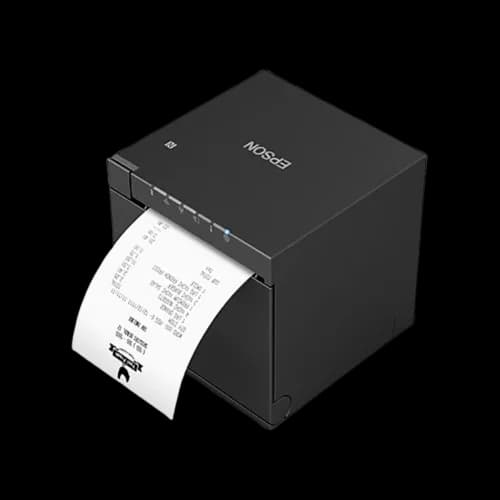
Epson TM-m30III 80mm Receipt Printer
฿14,900
Prints at 300 mm/s with built-in USB, LAN, Bluetooth, and Wi-Fi.
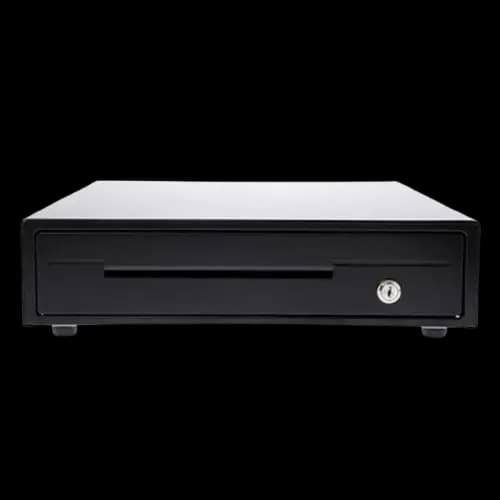
MAKEN EK-350 Cash Drawer — 4 Bill and 8 Coin Slots
฿2,000
A durable steel cash drawer with RJ11 automatic opening through a compatible printer.
Related Content
Related Articles
Documentation
Frequently Asked Questions for Franchise Businesses
Answers to the questions franchise and multi-branch owners ask most.
Does it support franchise or multi-branch businesses?
Yes — a single owner account manages multiple branches, sharing a product catalog and recipes. View a combined dashboard and compare sales across branches from one screen.
Can I change a central price across all branches at once?
Not currently — the system does not yet support adjusting a central price shared across all branches. If your business needs to manage pricing across multiple branches, contact our team to talk through the setup that fits your stores.
If one branch is running low on stock, can I transfer from another branch?
Yes — create a stock transfer between branches directly in the same system, without coordinating by phone outside of it.
Does the system automatically calculate franchise royalty fees?
Not currently — the system does not have a dedicated royalty-fee calculation feature. What it does support is managing multiple branches under one account, with combined sales and stock visibility across all of them. If you need to calculate royalty fees separately, the per-branch sales reports the system provides can feed into that calculation externally.
Do I need to set up products and recipes from scratch for every new branch?
No — a new branch can use the shared product catalog and ingredient recipes immediately. You only need to adjust what's actually different for that branch, such as a branch-specific menu item.
What are the terms of the free trial?
A free 30-day trial, no cost, no credit card required. Set up your products and start using it right away.
Ready to Expand Your Franchise?
Try MeeD POS free for 30 days — no cost, no credit card required.
Start Free Trial